Why Google Ads, GA4 and CRM numbers don't match, and which one to trust
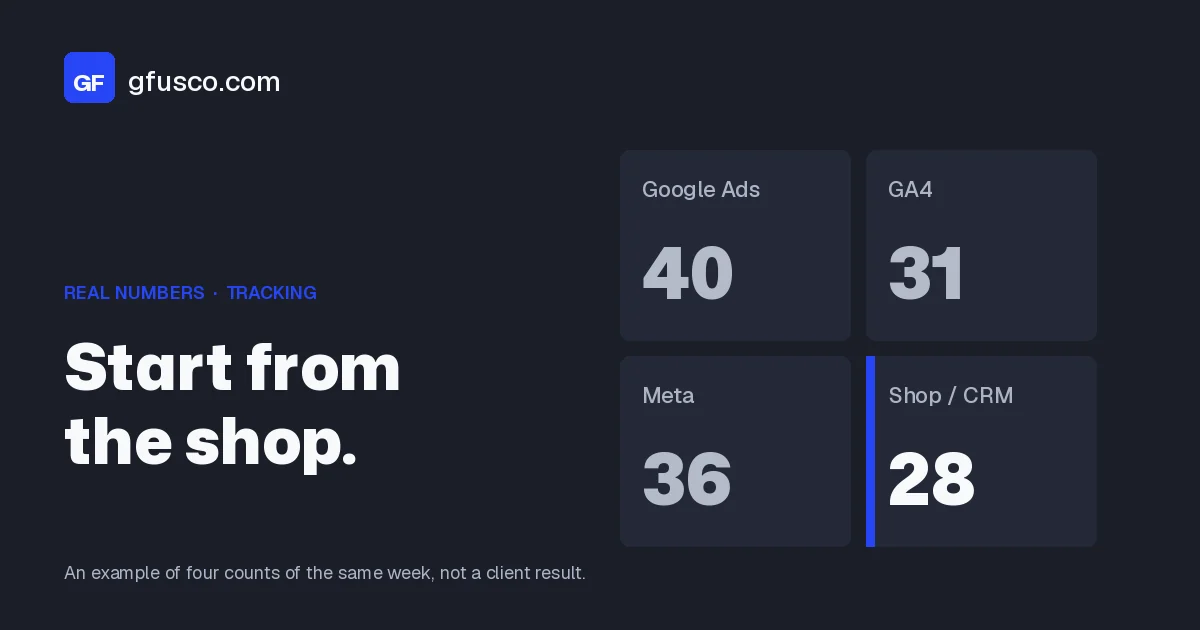
Google Ads, GA4, Meta and the CRM often show a different number of conversions. That is normal. They count different actions, on different days, with different windows. I start from the shop or the CRM. Then I check whether the gap is only attribution, or a real tracking error.
Why don't the numbers match?
Each tool does a different job.
- Google Ads usually credits the last click on one of its ads, and records the conversion on the date of that click, not on the date of the sale or the form.
- GA4 records the conversion on the day it happens, and can credit other channels, not only paid search.
- Meta uses its own windows, and some columns include view-through conversions.
- The CRM or the shop counts people and orders. It does not care which ad got the last click.
There is also modelling. When consent, browsers or ad blockers hide a conversion, Google can still report a modelled one. The CRM will never see that record. And if you add Google and Meta together, you count twice the people who saw ads on both.
Another piece is the definition. A click on submit, a thank-you page, a short call, a lead sales accepted, and a closed sale are different events. If Google counts the first and the CRM counts the fourth, the totals will not match. Before you look for a bug, write down what each system is actually counting.
What does Google itself say about the gap?
In its help pages Google writes that, when you compare Ads with Analytics or with your own systems, a gap of up to 20% can be expected, because of attribution models and because Ads reports on the click date. It also says to wait 24 to 48 hours, and to use the "All conv. (by conv. time)" or "Conversions (by conv. time)" column if you want a fairer comparison.
A stable gap around that size is a starting point, not a free pass. A sudden jump after a site change is a different story.
Google also says that a change to the counting setting only applies to future conversions. If you switch from Every to One today, last week's reports stay as they were. After a change, only compare the days that follow it.
Which number should you trust?
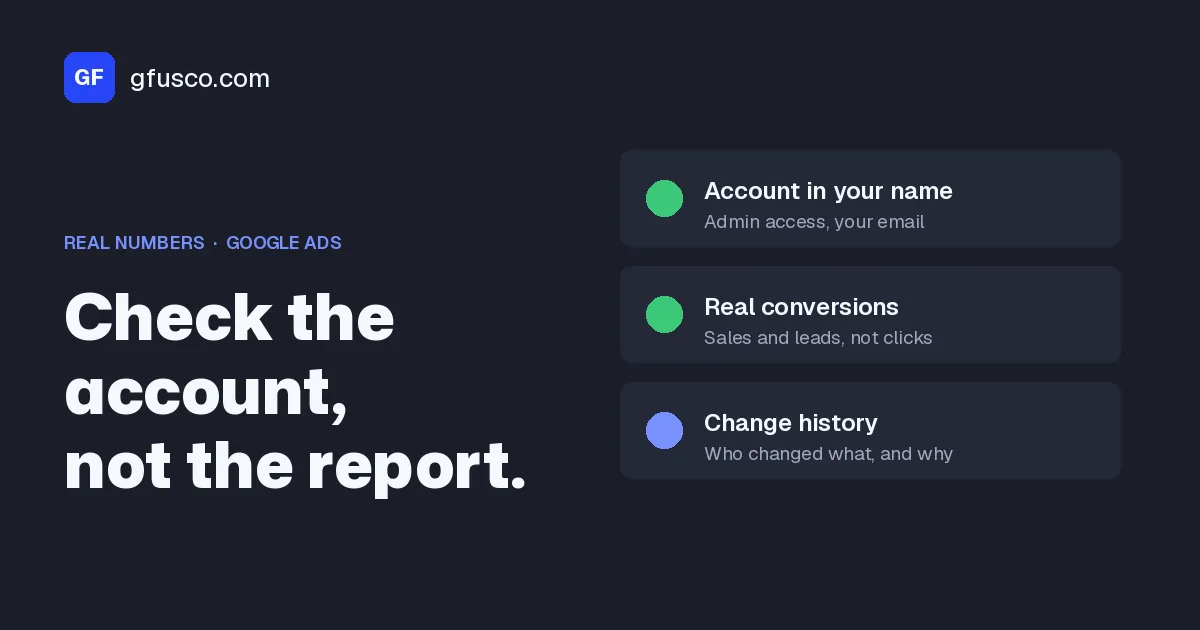
I start from the shop or the CRM: forms with a name and email, real orders, deals marked as won. That is the number sales recognises.
Then I work backwards. If Google Ads is higher, I ask what it is counting that the CRM does not see: modelled conversions, a second tag, a newsletter form that shares the same conversion action, view-through, or a Google-hosted lead form that never reached the CRM.
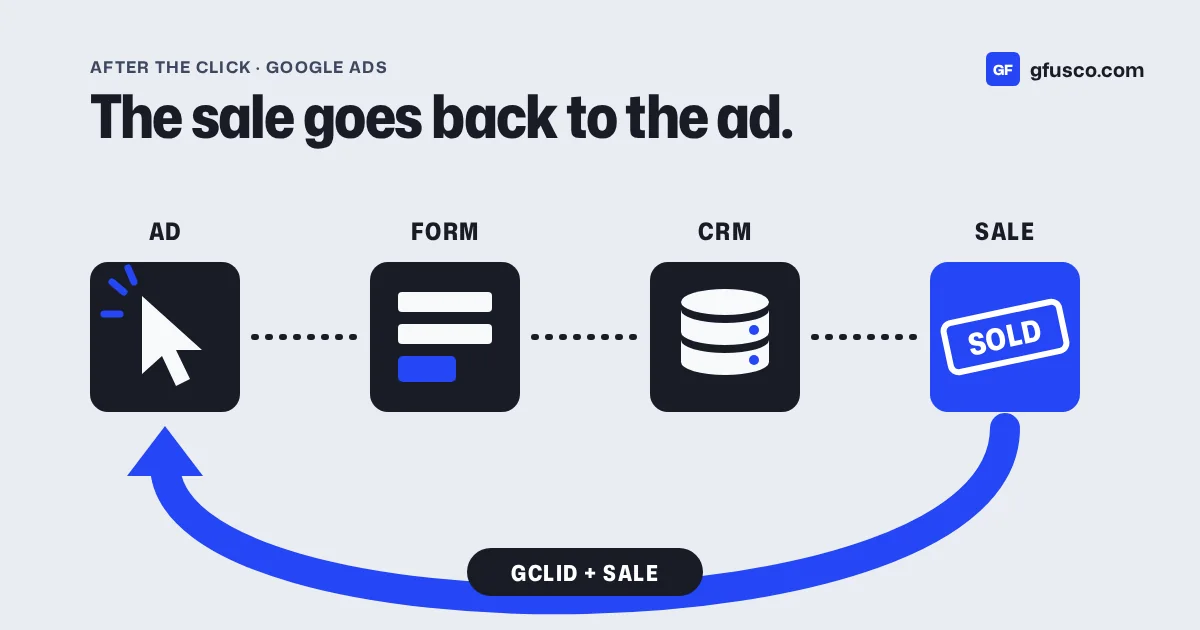
If the CRM is higher, something is missing in the tag, in consent, or in the GCLID that should have travelled with the lead.
One more check, before I trust shop ROAS: I ask which orders should be left out. In a European ecommerce store, sales from a refurbished-goods marketplace sat in the shop total even when they did not come from the ads. Shop ROAS is useful only if you know what does not belong.
Use the platform numbers to compare campaigns and keywords, because that is what bidding sees. Use the CRM or the shop to say what a customer cost, and where to put budget across channels.
How do you compare the numbers fairly?
This is the order I use.
- Pick a closed date range and wait 48 hours after the last day. I avoid "last 7 days": late conversions and processing make it incomplete.
- Check time zones. The Google Ads account, the GA4 property and the CRM should use the same zone, or you should at least know the offset when you compare days.
- In Google Ads, add the "Conversions (by conv. time)" or "All conv. (by conv. time)" column. Then you compare the day the person submitted the form or bought, not the day of the click.
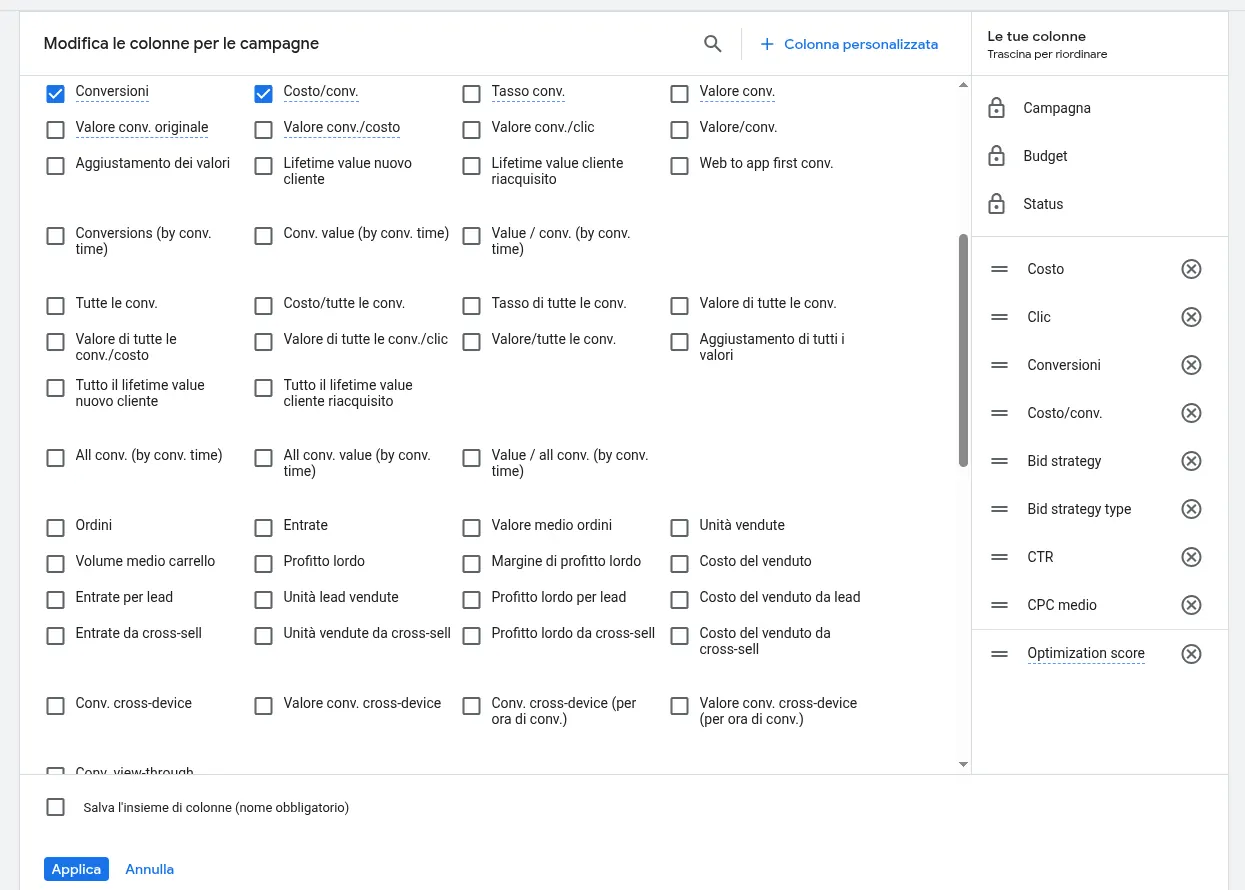
Campaigns, Columns icon, Modify columns. In the Conversions group you find “Conversions (by conv. time)” and “All conv. (by conv. time)”, the two columns that count by conversion date. Client account, names and identifiers replaced. - In GA4, look at the same action, with event scope. If you are comparing paid search only, filter to google / cpc.
- In the CRM or the shop, count unique people or orders, with the UTM or GCLID if you have them. Remove tests and duplicate submits, but do not delete them: mark the status, so you can explain the gap later.
- Do not add Meta and Google together.
Here is a worked example, with example numbers, not a client result. In a closed 14-day window that ended at least seven days ago, Google Ads shows 40 lead conversions. GA4 shows 31. The CRM has 28 people with a name and email.
| Source | What it counts | Example |
|---|---|---|
| Google Ads, Conversions column | Primary actions, usually on the click date | 40 |
| Google Ads, Conversions (by conv. time) | The same actions, on the conversion date | 36 |
| GA4, generate_lead event, google / cpc | Site events on the day they happen | 31 |
| CRM, unique people | Records with a name and email, no tests, no duplicates | 28 |
A gap like that can come from modelled conversions, a thank-you page that fired twice, a form that is not a sales lead, and a test submit. Change the proportions if you want. The point stays the same: the platform counts signals. The inbox counts people.
How to check conversion actions, step by step
A lot of gaps start here, not in the tag. Check every primary action before you touch the site.
- Open Google Ads. Click the Goals icon, then the Conversions drop-down, then Summary.
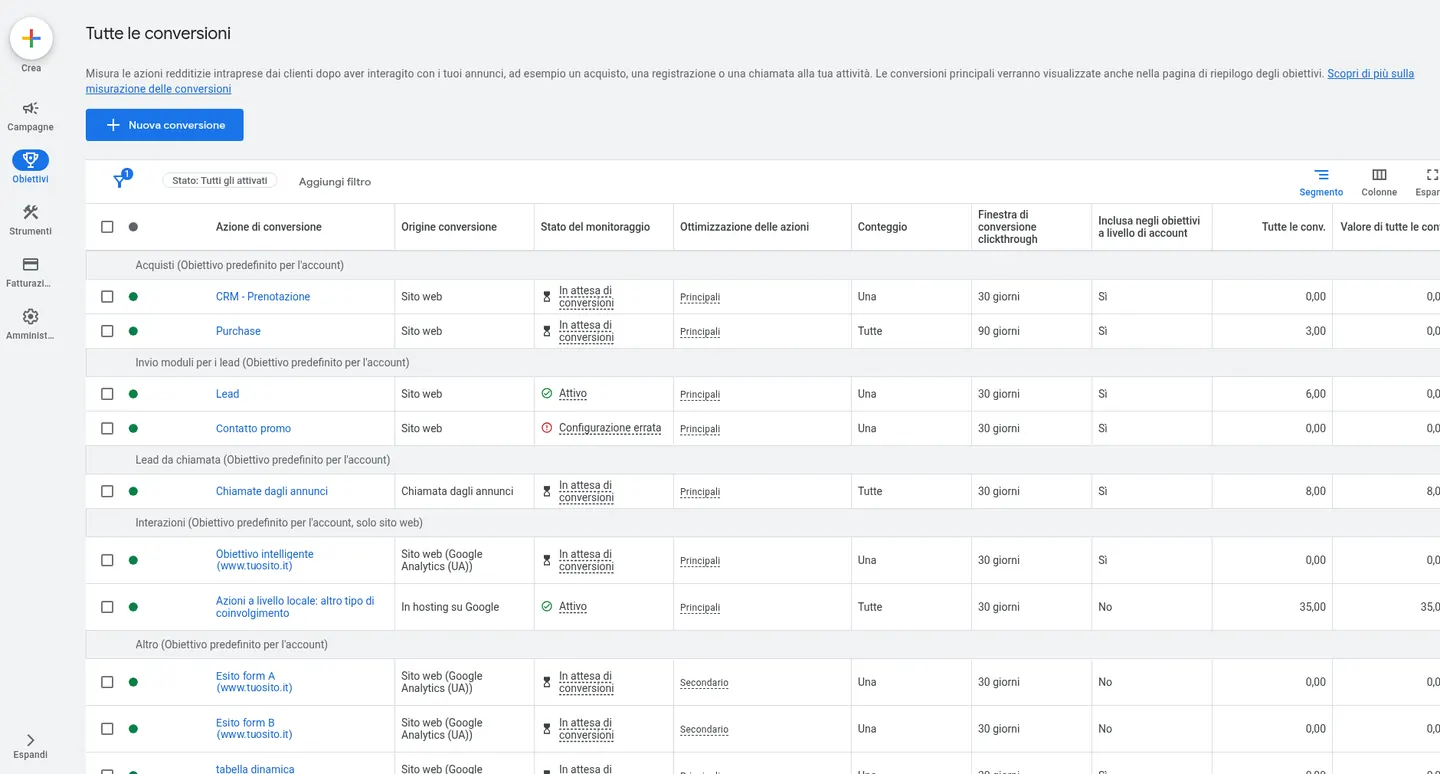
Goals, Conversions, Summary, “View all conversion actions”: for each action you see source, status, optimization (Primary or Secondary) and count (One or Every). Client account, names and identifiers replaced. - Open each action that stands for a lead or a sale. Click the name, then Edit settings.
- Open Count. For a lead, Google's help says to choose One: only one conversion per ad click. For a sale, it says Every, because each order adds value. The default for many website actions is Every. If a lead submits two forms after one click, Every counts two and the CRM usually counts one.
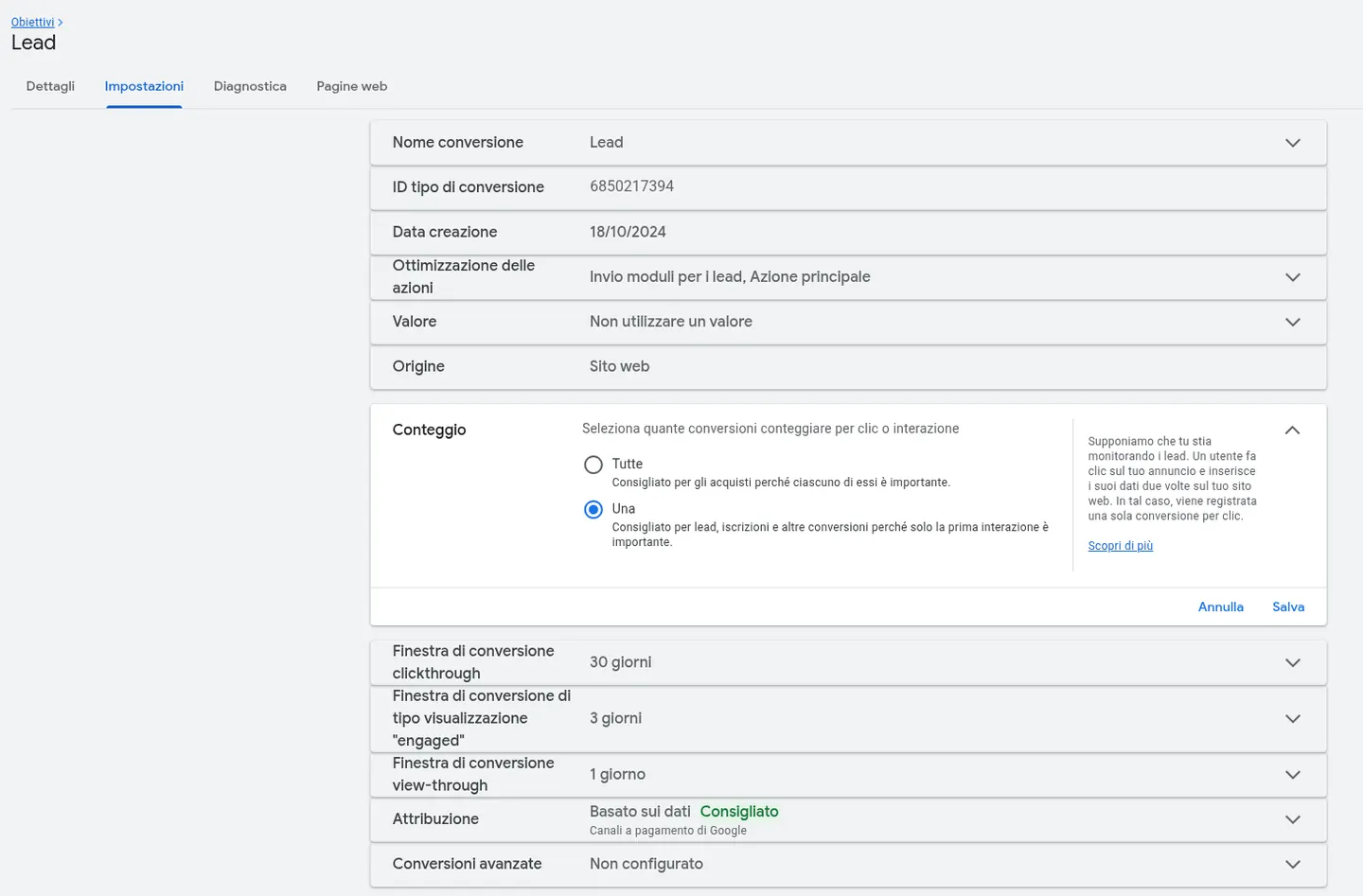
Action settings, Count section: “Every” for sales, “One” for leads. In this example the Lead action counts one conversion per click. Client account, names and identifiers replaced. - Go back to Summary, find the goal and click Edit goal. In the Conversion action optimization section, set as Primary only the action you want to bid on. The others, such as a button click, a page view, or a GA4 event that repeats the same form, go to Secondary (observe only). Primary actions go into the Conversions column and drive Smart Bidding. Secondary actions stay in All conversions, unless you put them in a custom goal.
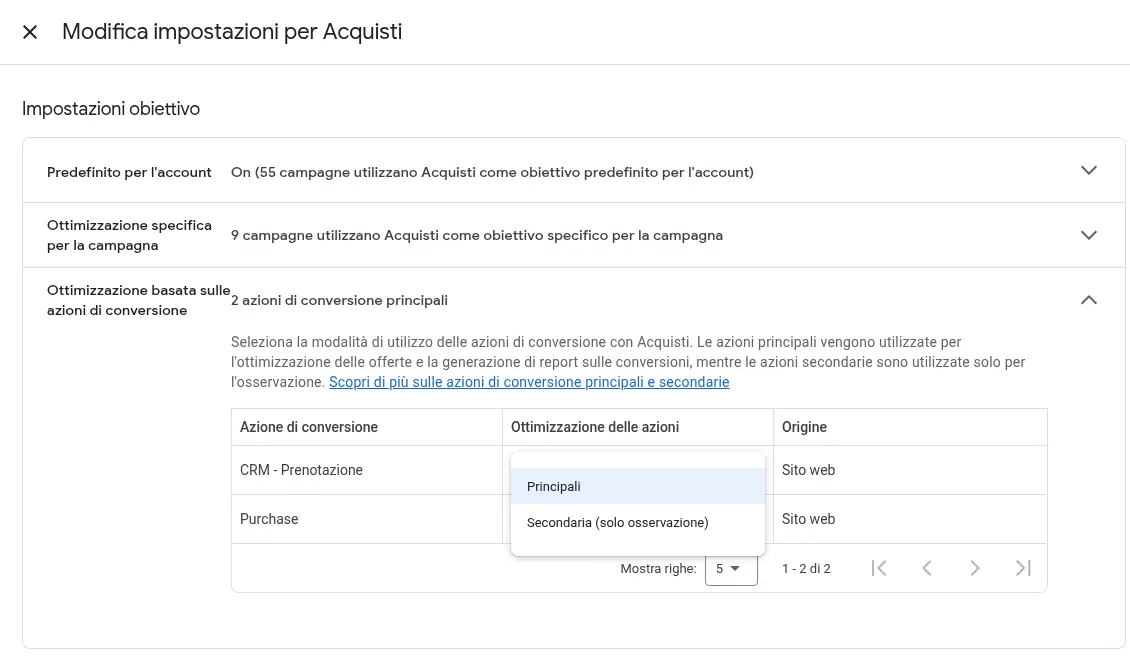
Edit goal, optimization based on conversion actions: for each action pick Primary or Secondary (observe only) in the menu. Client account, names and identifiers replaced. - Check that you do not have two primary actions for the same lead. The usual case is the form submit and the thank-you page view, or the Google Ads tag and the same event imported from GA4, both set as primary.
- Do a test submit. Fill in the form, land on the thank-you page, and check that the CRM creates one record and that Google Ads records one conversion.
If you change Primary, Secondary or the counting setting, Smart Bidding can go back into learning. Google talks about 7 to 14 days. Do not judge the campaign the next day.
Common mistakes
- Comparing "last 7 days" across Ads, GA4 and the CRM. Recent days are incomplete, and click dates and conversion dates do not line up.
- Leaving Count on Every for a lead action. That is the default for many website actions. For leads, use One if you want a total closer to the people in the CRM.
- Keeping two primary actions for the same form. The Ads total can end up close to double.
- Adding Google and Meta and calling that sum "paid leads". One person can be counted by both.
- Deleting spam and tests from the CRM. You lose the proof of why the platform counted more. Mark the status, do not delete the row.
- Ignoring the time zone. An Ads account on US time and a CRM on Rome time moves evening leads into the next day.
- Treating an attribution gap as a tracking bug, or blaming the campaigns when a tag fires twice.
When is the gap a real tracking problem?
Attribution explains a stable gap. These are the problems I look for in practice.
A number drops and the first reaction is "Analytics is broken". Sometimes it is. After a site migration I have seen two months of data that simply cannot be used. In that case the tag was then present on every page, and the traffic drop, almost all from organic search, had started before the new site. The first question is whether the data is broken. The second is worse: what if the data is right?
Data can also look complete and not be. In one GA4 property, city and region were "(not set)" on almost all traffic for almost two years. Country was read correctly. Another property of the same company worked. Possible causes included the European granular location setting, a server-side GTM setup that strips the IP, and Consent Mode. On top of that, a custom "region" dimension was collecting a piece of URL instead of the store location. For two years, area reports were made in the dark.
A cookie banner can break links or double page views. On a B2B shop, after a new banner, people who declined cookies found a ?_gl parameter in the address and the shop filters broke. I did not turn Consent Mode off. We removed _gl after the Google tag had read it, and I tested the site with cookies declined, accepted, and with no choice yet. The UTMs stayed. Data arrived in Analytics. Page views were not doubled. If you need the setup order, I wrote it in Consent Mode v2.
Permissions matter too. On a B2B Ads account the daily check could not read GA4: a 403, not enough access. That day there was no comparison between ad clicks and GA4 sessions. If you cannot open the property, you do not invent the number.
And sometimes the platform counts the same thing twice at the source. On a Shopify store an old feed app was still connected and sent products to Merchant Center at night, on top of the main app. Some refurbished items showed as new. Before I touch Shopping bids I check who is sending the feed. Sometimes it is two apps. The same goes for purchase events: if the purchase fires twice, bidding learns the wrong thing. Server-side tracking can make this better or worse, depending on how you deduplicate.
What should you do once you know which number is true?
After you have fixed counting, primary actions and a test submit, for two weeks I compare the same closed period with the "by conv. time" columns. I am not looking for a gap of zero. I am looking for a stable ratio between people in the CRM and conversions in Ads, which should move the same day if a tag breaks.
If the true source is the CRM, send qualified leads and sales back to Google Ads and Meta as offline conversions. Then the platforms bid on what you care about, not only on form fills. To do that you need the GCLID, GBRAID or WBRAID stored on the record, or hashed email and phone if you use enhanced conversions for leads.
If a tag is wrong, fix that first. Server-side tracking and Consent Mode help recover data you were losing. They do not make four dashboards print the same integer.
You can see how a change in close rate moves cost per customer in the cost per lead calculator. The maths is explained in the article on cost per lead and cost per customer.
FAQ
Is it normal that Google Ads has more conversions than GA4?
Yes, often. Ads can include modelled conversions and reports on the click date. Compare with the "by conv. time" columns and wait 48 hours. A stable gap can be normal. A sudden jump after a site change is not.
Which number should I show the client or my boss?
The shop or the CRM, plus a short note on why Ads and GA4 differ. Do not present a platform screenshot as the only figure.
Should I add Google and Meta conversions together?
No. One person can see both. Each platform often claims the same sale.
Does server-side tracking make the numbers match?
No. It can recover some events lost to browsers and blockers, where consent allows it. It does not change attribution windows.
Should lead actions count One or Every?
For leads, Google's help says One: one conversion per ad click. Every is a better fit for sales, where each order counts. The change only applies to future conversions.
How do I add the by conversion time column?
In the Campaigns table open Columns, then Modify columns, and in the Conversions section select "Conversions (by conv. time)" or "All conv. (by conv. time)". Use it for the CRM comparison. To judge bidding, keep looking at the standard Conversions column too, because that is what Smart Bidding uses.
Why do monthly totals get close, but the days do not?
Because Ads, in the standard column, puts the conversion on the click day, and the CRM puts it on the day the lead arrived. Different time zones also move evening records into the next day. Compare a closed month, or use the "by conv. time" columns.
What are modelled conversions?
They are estimates Google adds when it cannot observe a conversion, for example because the person declined cookies. They have no matching CRM record. That is why a small gap can remain even when tracking is in good shape.