Consent Mode v2: what it is, basic vs advanced and how to set it up
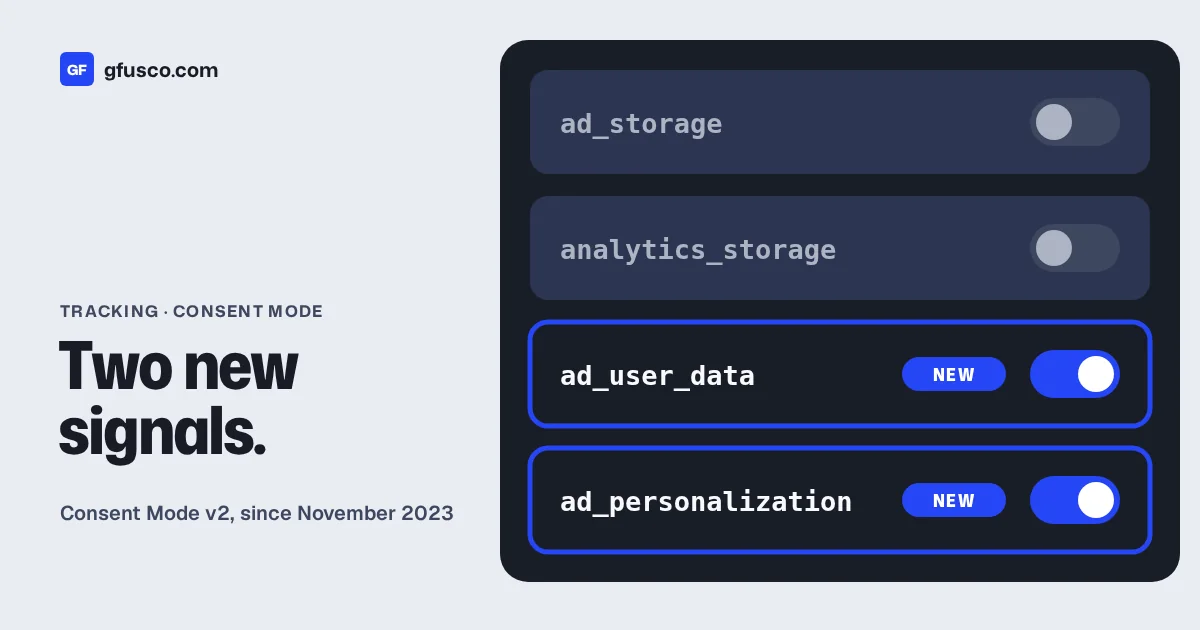
Consent Mode v2 is how your website tells Google tags what each visitor agreed to in the cookie banner. Version 2 added two signals, ad_user_data and ad_personalization, to the original ad_storage and analytics_storage. If you advertise to people in the EEA with Google Ads, you need it set up correctly, or your measurement and audiences suffer.
It is also one of the most common things I find broken in audits. Here is how it works.
What is Consent Mode?
Consent mode passes your visitors' cookie consent choices to Google. Google tags then adjust what they do. If a visitor says no to ad cookies, the Google Ads tag does not set ad cookies for that person.
Consent Mode is not a cookie banner. You still need a banner or a consent management platform, often called a CMP. The banner collects the choice. Consent Mode passes it to Google.
What changed in Consent Mode v2?
Google updated consent mode in November 2023 and added two parameters. Now there are four consent types:
| Consent type | What it controls |
|---|---|
ad_storage | Cookies and storage for advertising |
analytics_storage | Cookies and storage for analytics |
ad_user_data | Consent to send user data related to advertising to Google |
ad_personalization | Consent to personalised advertising, such as remarketing |
The update is tied to Google's EU user consent policy. Sites using Google products must get valid consent from users in the European Economic Area, the UK and Switzerland. That covers cookies where the law requires it, and the use of personal data to personalise ads.
What is the difference between basic and advanced Consent Mode?
Google describes two ways to set it up.
| Basic | Advanced | |
|---|---|---|
| Google tags load | Only after the visitor interacts with the banner | As soon as the page opens, with consent denied by default |
| Before a choice | Nothing is sent to Google | Consent state is sent |
| If the visitor says no | No data at all, not even the consent state | Cookieless pings are sent, without cookies |
| Conversion modeling in Google Ads | General model | Advertiser-specific model |
Advanced mode gives Google more to work with, so its conversion modeling is more detailed. Basic mode sends less. Which one fits is a legal and company decision, not only a marketing one. Ask whoever handles privacy in your company.
How do you set up Consent Mode v2?
The order of the code matters. Google says that if your consent code runs out of order, the defaults will not work.
- Set the default state with
gtag('consent', 'default', ...)on every page, before any tag sends data. For EEA visitors this is usually all four types set todenied. - Load the consent banner. Most CMPs have a Google Tag Manager template that handles Consent Mode for you.
- Update the state with
gtag('consent', 'update', ...)as soon as the visitor makes a choice, on the same page. - Remember the choice so the right state is set on the next pages.
- Check each tag. Google tags have built-in consent checks. Other tags, like the Meta Pixel, need consent settings in Tag Manager.
You can scope defaults by region. For example, denied by default for the EEA and granted elsewhere, if that matches your policy.
What are the most common Consent Mode mistakes?
These are the ones I see most often:
- Defaults set after the tags fire. The tags have already sent data before the default exists.
- Only two of the four types. The banner sends
ad_storageandanalytics_storagebut not the two v2 signals. - The update fires on the next page. Google warns that if consent is not updated on the page where it is given, you can lose data. In GA4 this can mean sessions without a
session_startevent. - Meta and other tags ignore the banner. Consent Mode controls Google tags. Every other tag needs its own consent rule.
- "Accept" and "Reject" do the same thing. Test both. I have seen banners where rejecting changes nothing.
How do you check that Consent Mode works?
- Open the site in a private window and use Tag Assistant or GTM preview mode.
- Check the default state before you click anything.
- Reject everything. Check that no ad cookies are set, and that Meta and other tags do not fire.
- Accept everything. Check that all four types switch to granted on the same page.
- Check the consent diagnostics in Google Ads and GA4.
Google Ads and GA4 may also show consent mode impact results after at least seven full days with consent mode on.
How does Consent Mode affect your data?
When people say no, you see fewer conversions. Google can model some of them, but not all. Expect gaps in your reports, mostly in remarketing audiences and smaller campaigns.
This is one more reason to send your own first-party data. Offline conversions and enhanced conversions for leads use data your customers gave you directly. Server-side tracking gives you more control over what you send. Neither one replaces consent.
FAQ
Is Consent Mode v2 mandatory?
Google requires valid consent for users in the EEA, the UK and Switzerland under its EU user consent policy. Consent Mode is how Google tags receive that consent. If you advertise there, set it up.
Does Consent Mode make my site GDPR compliant?
No. It passes consent choices to Google. Compliance depends on your banner, your policies and your legal basis.
Basic or advanced: which should I choose?
Advanced gives better modeling. Basic sends less data. Decide with whoever is responsible for privacy in your company.
Does Consent Mode work with the Meta Pixel?
No. It controls Google tags. Block the Meta Pixel and other tags with your CMP or with Tag Manager consent settings.