Why Meta Ads leads don't answer the phone, and what to fix in the form and after
Meta Ads leads often don't answer the phone because they sent the form in two taps and forgot it, because you call from a number they don't know, because you call late or at the wrong time, or because the number prefilled from their profile is old. Most of the fix is outside the campaign. Use a Higher intent form with your business name and service written clearly, one qualifying question and phone verification. Then an ending screen that says who will call and from which number, a WhatsApp or SMS message the moment the lead arrives, a first call within minutes and a fixed plan for call-backs.
I wrote about response time in speed to lead, and about choosing between a form and a page in instant forms vs landing page. This one is narrower. The lead is there, sales calls, and the phone just rings.
Why don't Meta Ads leads answer the phone?
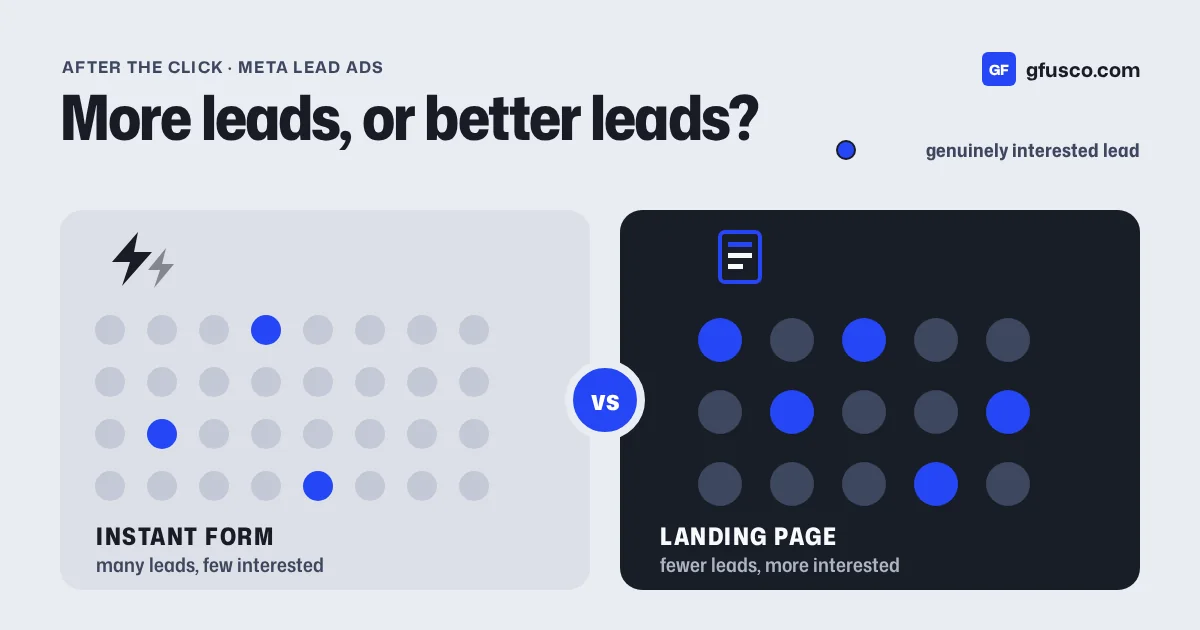
An instant form opens inside Facebook or Instagram. Name, email and phone are already filled in from the profile. Two taps and it's sent. That is why the leads are cheap, and it is also why so many never pick up.
On Reddit, in r/FacebookAds, the same complaint keeps coming back. Leads who never answer calls or texts. People who say they never submitted anything. Others who did submit, but have no idea which service they asked for (one thread, another). They are not lying. They tapped an ad on the sofa at night and forgot.
These are the causes I see most:
- They don't remember the form. If the form doesn't show your business name and the service, they don't know who you are when you call.
- The number is unknown. A call from a number that is not in their contacts looks like a sales call.
- You call late, or at the wrong time. The lead comes in at 9 pm, you call back at 11 the next morning, when they are at work.
- The number is wrong. Meta prefills the phone number saved on the profile, which can be years old.
- The ad promised something else. Someone who wanted the free guide does not expect a phone call.
Only the last one sits in the campaign. The others you fix in the form and in the first minutes after it.
How do I tell if the problem is the form or the follow-up?
Before changing anything, I look at the outcome of every call. A sheet is enough, or one field in the CRM. After two or three weeks it already tells you a lot.
- It rings out, even after a text. Usually it's the time of day, or the number you call from.
- The number doesn't exist, or someone else answers. Phone verification helps here.
- "I never filled anything in." A Higher intent form helps here.
- They answer, but wanted something else. The ad tells a different story from the call.
- They answer, they're interested, then don't buy. That's the offer, the price or sales, not the phone.
I put marketing and sales on the same sheet. Platform leads on one side, call outcomes on the other. One client, a tour operator, sends me the real enquiries of the week every Friday, and I compare them with the campaigns. It's the most useful report I get.
How do I set up the form so people answer, step by step?
In Ads Manager you create the form at ad level, in the Destination section. This is the order I work through the editor.
- Write an intro with your business name and the service. The Intro section gives you a headline of up to 60 characters and a description, as a paragraph or a list. Put the business name and the service in the headline, for example "Custom bathroom quote from Smith Renovations". In the description say what happens next: "We'll call you today to understand the job." People who read your name recognise it when you call.
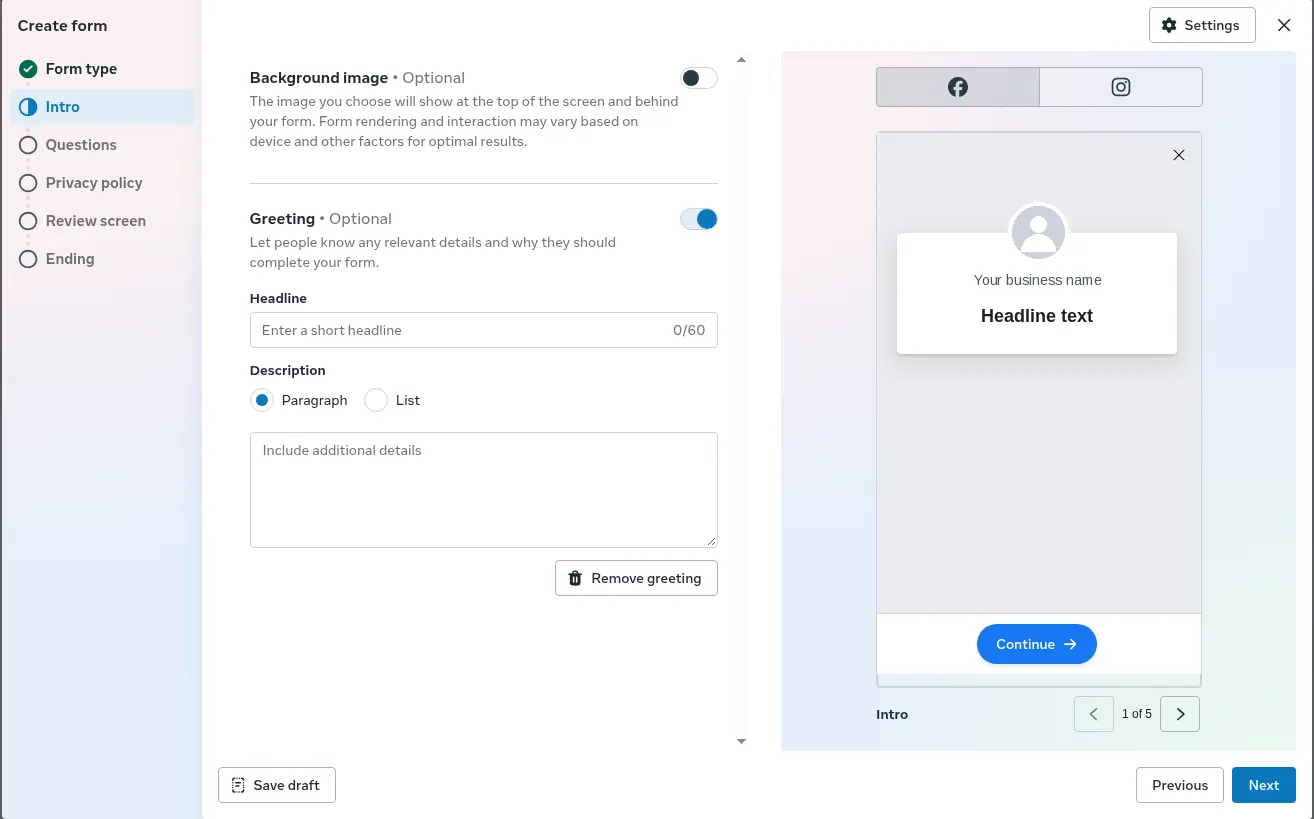
Intro section: headline up to 60 characters and a description. The example is empty: you write the business name, the service and what happens after the form. The Page name in the preview is replaced. - Pick the Higher intent form type. The default is More volume, built to be sent fast. Higher intent adds a line under the contact fields saying the business may follow up, and a review screen where people confirm their details before sending. Meta recommends it when every lead needs a follow-up. It only shows in the Facebook and Instagram mobile feed, not on desktop.
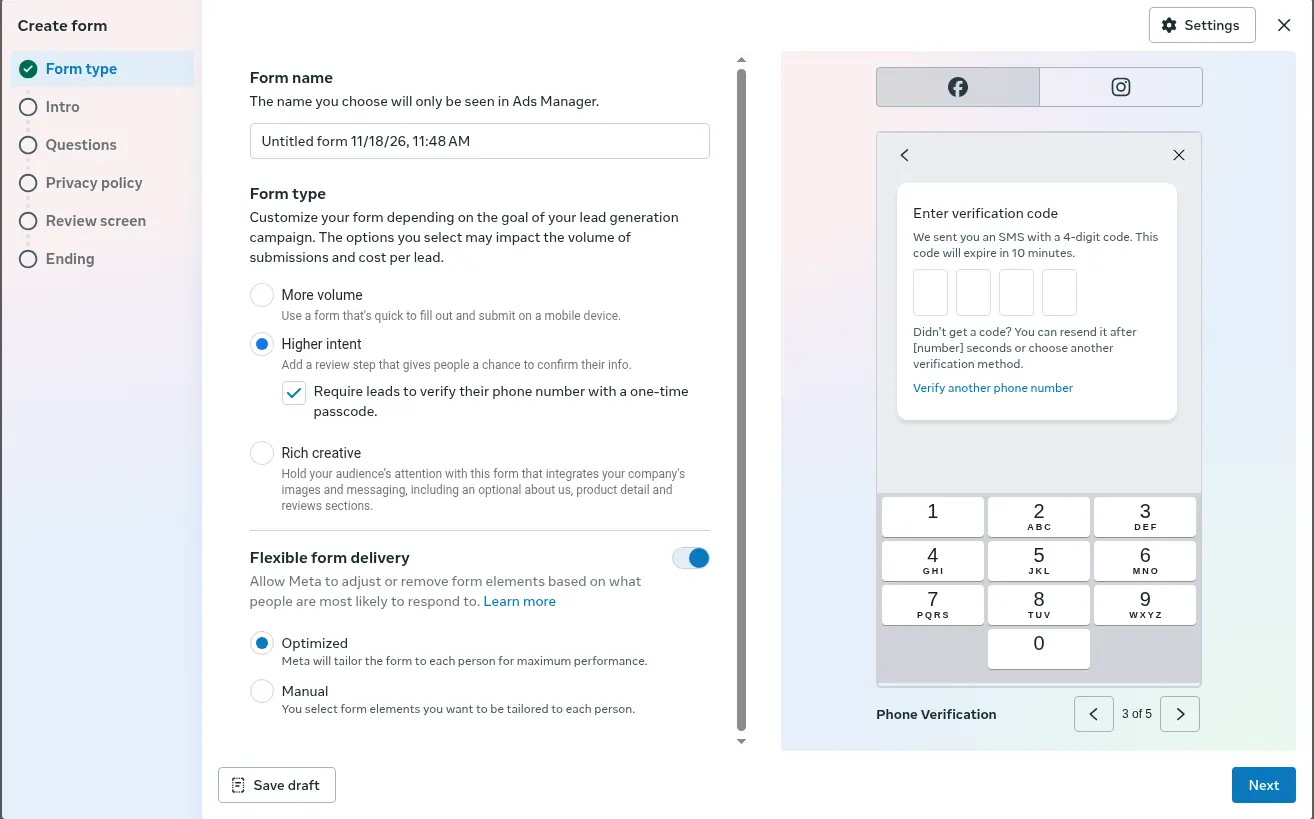
Form type: pick “Higher intent” and tick the phone number verification with a one-time passcode. - Add one qualifying question. Under Questions, below the contact fields, add a custom multiple-choice question about the service, the area or the timing. For example "When do you want to start?" with "within 3 months", "within a year", "just looking". One is enough. It also tells you who to call first.
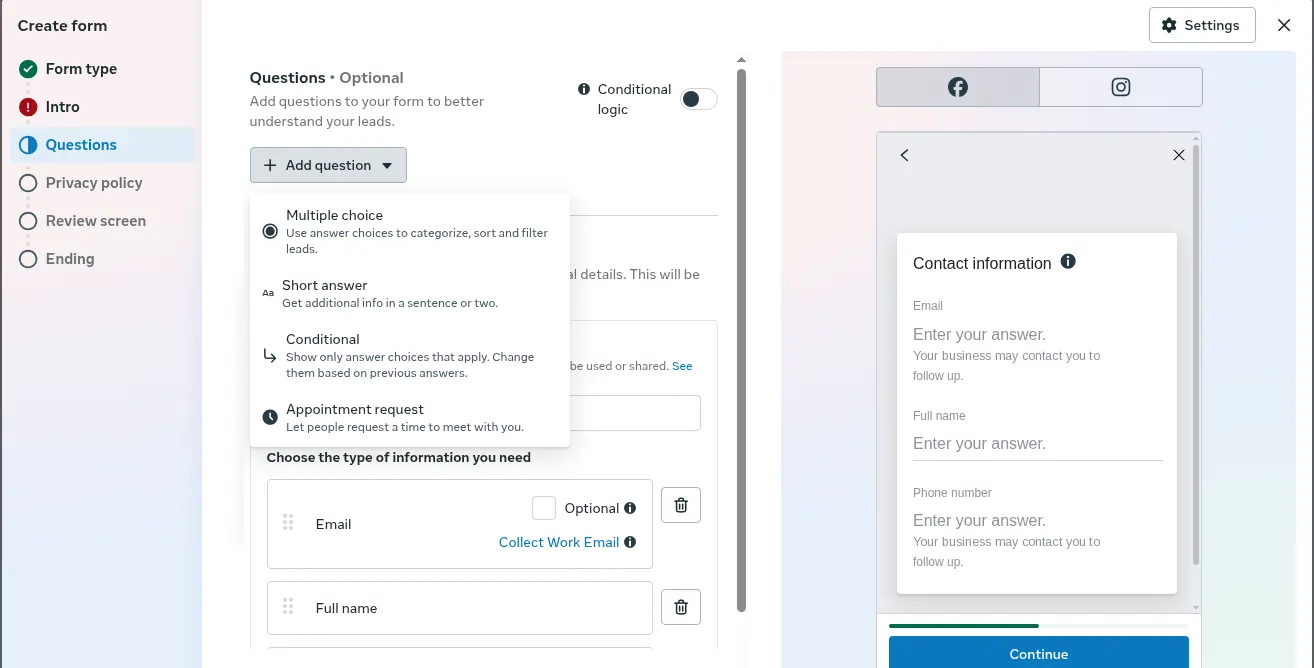
Questions section: from “Add question” pick “Multiple choice” for the qualifying question. Below are the contact fields, phone number included. The Page name in the preview is replaced. - Turn on phone verification. With Higher intent, the editor has a box called "Require leads to verify their phone number with a one-time passcode". With the other form types the same option sits in the Destination section. The person gets a code and types it in before sending. In markets like Italy, Spain and the Netherlands it usually arrives on WhatsApp, elsewhere by SMS. Phone number must be a required field, not the work phone number, and a landline can't pass the check. The downloaded leads file has a phone_number_verified column with TRUE or FALSE.
- Write an ending screen that says who will call, and from which number. Under Ending you find Message for leads, with a headline of up to 60 characters, a description and a button. Choose Call business and add your real number, the one you will call from. In the description write something like "Sarah will call you within the hour from the number below. Save it, so you know it's us."
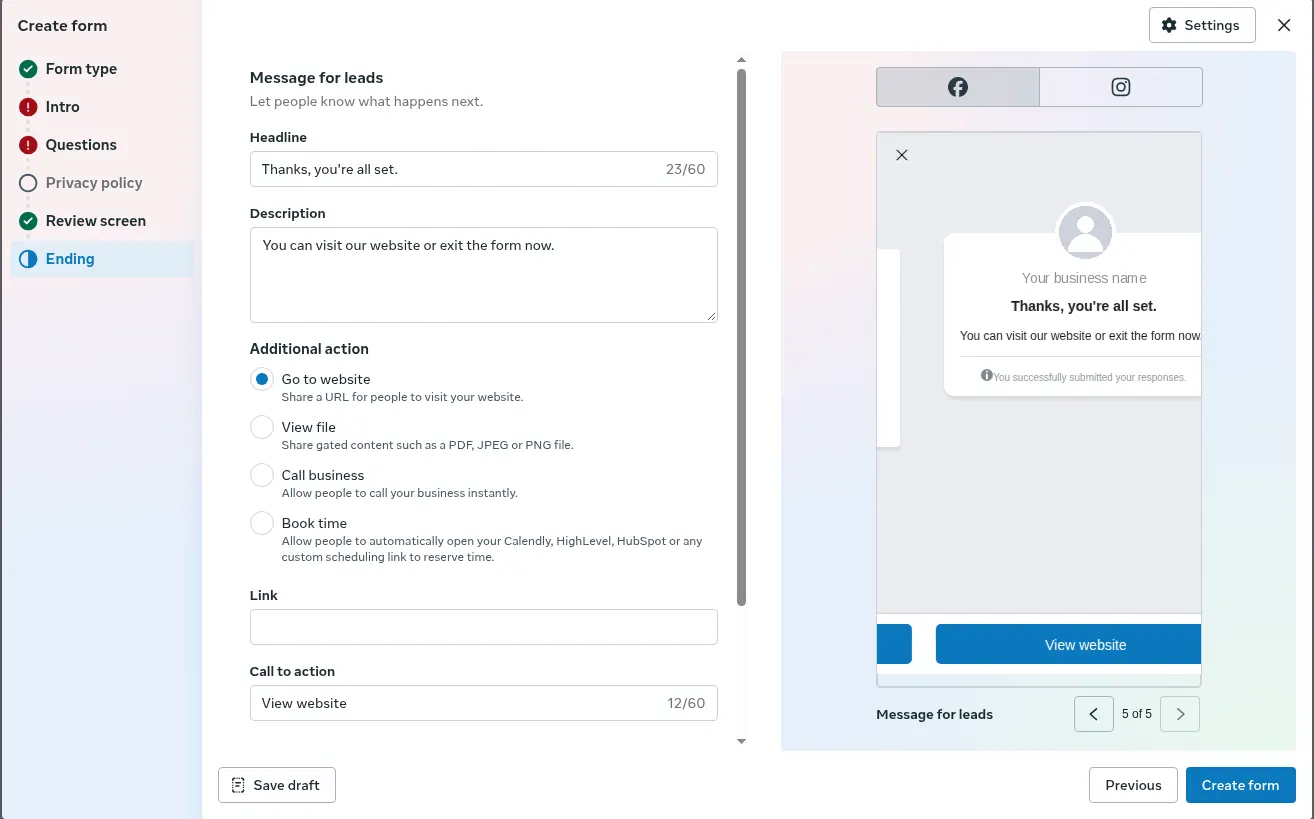
Ending section, Message for leads: headline, description and action. The actions include “Call business”: that is where you put the real number you call from. The example leaves the default. The Page name is replaced.
You'll get fewer leads, and cost per lead may go up. Meta says so itself about phone verification. That's fine, as long as the people who come through answer.
What do I do in the first minutes after the form?
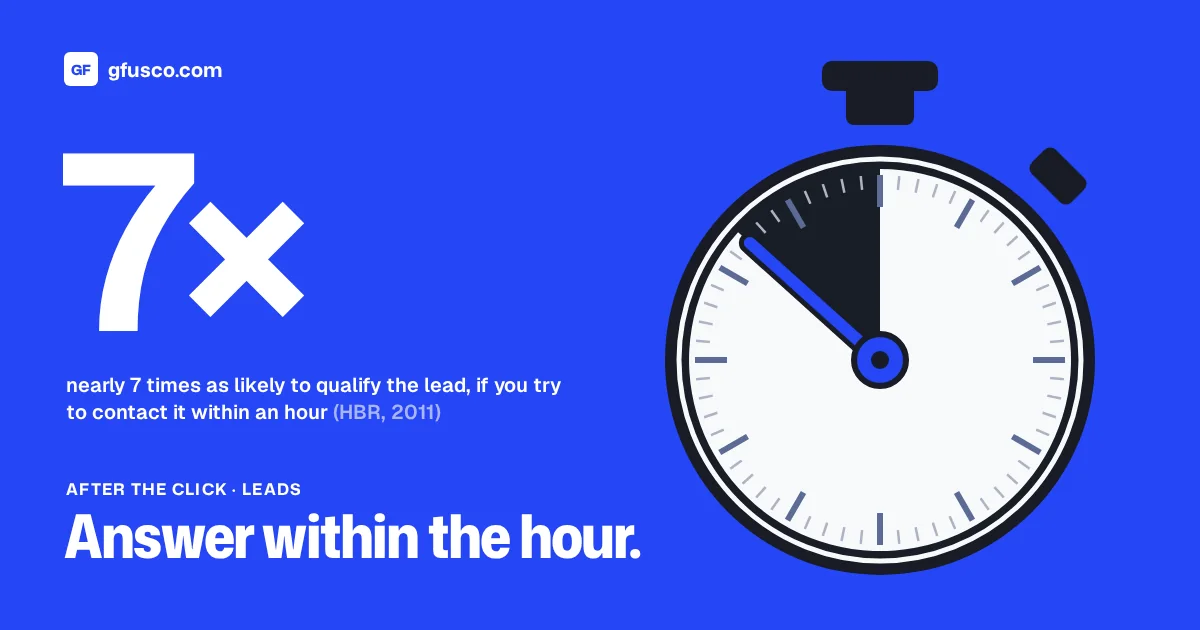
Why the first hour matters is in the speed to lead post. Here the point is different. The first call should not come from a stranger.
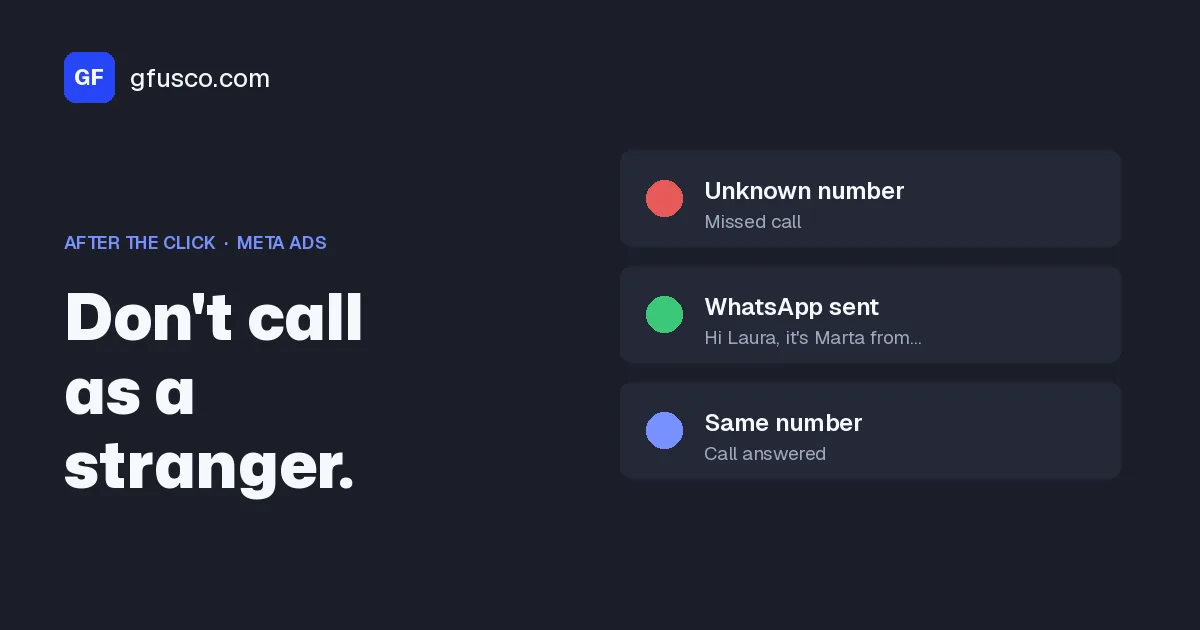
- Text first, then call. As soon as the lead lands in the CRM, an automatic WhatsApp or SMS goes out. It says who you are, what they asked for in the words of the form, and when and from which number you will call. For example: "Hi Laura, it's Sarah from Smith Renovations. We got your request for the bathroom. I'll call you within the hour from this number."
- One number. Call from the same number as the text and the ending screen. If the call comes from a different switchboard, you are a stranger again.
- Within minutes, during working hours. The new-lead alert goes to the phone of one named person, not to a shared inbox.
- Open the call with the ad. "You left your details on our Instagram ad about the bathroom."
- Evenings and weekends, at least the text. If nobody can call at 10 pm, the automatic message says when you will, and the first call goes out the next morning.
Automatic WhatsApp messages need WhatsApp Business connected to your CRM through a provider. SMS is simpler. For wording and consent, check with whoever handles your privacy.
How many times should I call back a lead who doesn't answer, and when?
One call is not a follow-up. Plenty of people miss the first one because they are driving or in a meeting. This is the sequence I start from. It's not a Meta rule, it's mine.
- Right away. Automatic text.
- Within 15 minutes. First call. If they don't pick up, no long voicemail. A short text instead: "Just tried to call. When suits you best?"
- Same day, different time slot. If the lead came in the morning, try again late afternoon.
- Next day. Second call, at another time again.
- Day three or four. A last, polite text: "I won't bother you again. If you still need this, reply here and I'll call you."
Four or five attempts across different days and times. Not five calls in one afternoon. If the form asked for a preferred time, use it. Every attempt goes into the CRM with its outcome.
How do I connect leads to the CRM and tell Meta which ones were good?
If someone downloads leads from Meta once a day, half the problem is right there. Meta also keeps lead data available for only 90 days after the form is sent. To start, Leads Centre in Meta Business Suite is enough: you assign each lead to a person, move it through stages and set reminders. If you already have a CRM, connect it with a native integration or with Zapier, so each lead arrives within seconds.
Then the part almost nobody does. Meta optimises for whatever you tell it is a conversion. If the conversion is "form sent", it looks for more people who send forms, including the ones who tap by mistake. With the conversion leads performance goal and your CRM connected through the Conversions API for CRM, you send the lead stages back: who qualified, who booked, who bought.
Setup goes through Events Manager: Data sources, Connect data sources, CRM, then a partner or a manual connection. Every lead in the CRM must keep its Meta lead ID, 15 or 16 digits long. Meta asks you to send every stage, including the raw lead and the ones that did not qualify. It's the same idea as Google Ads offline conversions.
In the CRM I always add one extra stage, "reached by phone". It shows me, ad by ad, how many leads actually answer.
What does it look like with numbers?
Made-up numbers to show the maths, not a client case. Before. More volume form, 100 leads in a month at €12 each, so €1,200 spend. Sales call them the next day and reach 35. Cost per reached lead is about €34.
After. Higher intent, one timing question, phone verification, an automatic text and a call within 15 minutes. You get 70 leads at €17, so €1,190. You reach 45. Cost per reached lead drops to about €26.
In Ads Manager, cost per lead went from €12 to €17, and it looks worse. The number that matters is what you pay for a person you actually spoke to, and then for a customer. Put your own numbers in the cost per lead calculator to see the most you can pay for a lead. If you sell online, there is the break-even ROAS calculator.
What are the most common mistakes?
- The form headline says "Request info" and nothing else. No business name, no service.
- The ending screen is left on the default and says nothing about who calls or when.
- Calls go out from a switchboard, or from whoever is on duty, a different number each time.
- Phone verification won't turn on because phone number is optional, or asked as a work number.
- Ads run at night and at weekends, and no automatic message tells the lead what happens next.
- The campaign gets switched off because "leads don't answer", with no call outcomes ever logged.
What should I check in the weeks after?
- Share of leads reached, by ad. If one ad brings leads who never answer, the problem is the ad, not sales.
- Time from form to first attempt. Without it, every discussion is opinion.
- Answers to the qualifying question. If nearly everyone picks "just looking", the issue is the offer or the audience, not the call-back.
- Stages actually reaching Events Manager. If the integration has an error, diagnostics show it there.
I wait a few weeks before judging, because leads need time to become customers.
FAQ
Does the Higher intent form cost more?
Often yes, per lead, because it adds a step. The fair comparison is cost per reached lead and cost per customer.
Does phone verification work with landlines?
No. The code arrives by WhatsApp or SMS, so it needs a mobile. Someone who enters a landline can't send the form and isn't counted as a lead.
WhatsApp or SMS for the first message?
It depends on your customers. In Italy and Spain Meta itself sends verification codes on WhatsApp first. Automation needs WhatsApp Business connected to the CRM. Otherwise SMS is fine.
How many times should I call a lead who doesn't answer?
I make four or five attempts across different days and times, mixing texts and calls. Then a polite last message, and I stop.
Can I tell Meta which leads answered?
Yes. With your CRM connected through the Conversions API you send each lead's stage back to Meta, and with the conversion leads performance goal Meta optimises for those stages.
Sources
- About instant form types, Meta Business Help Center
- How to enable phone verification to improve lead quality, Meta Business Help Center
- Add an intro section to your lead ad with instant form, Meta Business Help Center
- Add a message for leads to your lead ad with instant form, Meta Business Help Center
- Ask the right questions on your lead ads with instant form, Meta Business Help Center
- Download or retrieve your leads data from Meta, Meta Business Help Center
- About Leads Center in Meta Business Suite, Meta Business Help Center
- Use a partner to connect your CRM for conversion leads, Meta Business Help Center
- Conversions API for CRM integration, Meta for Developers